Platform configurations
Set the limits AskRAI enforces across your tenant, such as the most agents any one organization may have active at once and how long the audit log is kept, and reset each to its default
Platform configurations are limits AskRAI enforces across your tenant. Each is a key from a fixed list: while a key is unset, AskRAI behaves as it does without it, and once it is set, AskRAI holds your whole tenant to it. Open the page with the Admin control in the top navigation bar, then choose Platform configurations under Platform, after Organizations.
Platform configurations opens to the holders of View platform configurations, read-only, and of Manage platform configurations, who set and reset its keys; Platform Admin holds both. Both are assigned to users or groups through roles under Admin → Access. Anyone else does not see Platform configurations in the Admin navigation and cannot open the page.
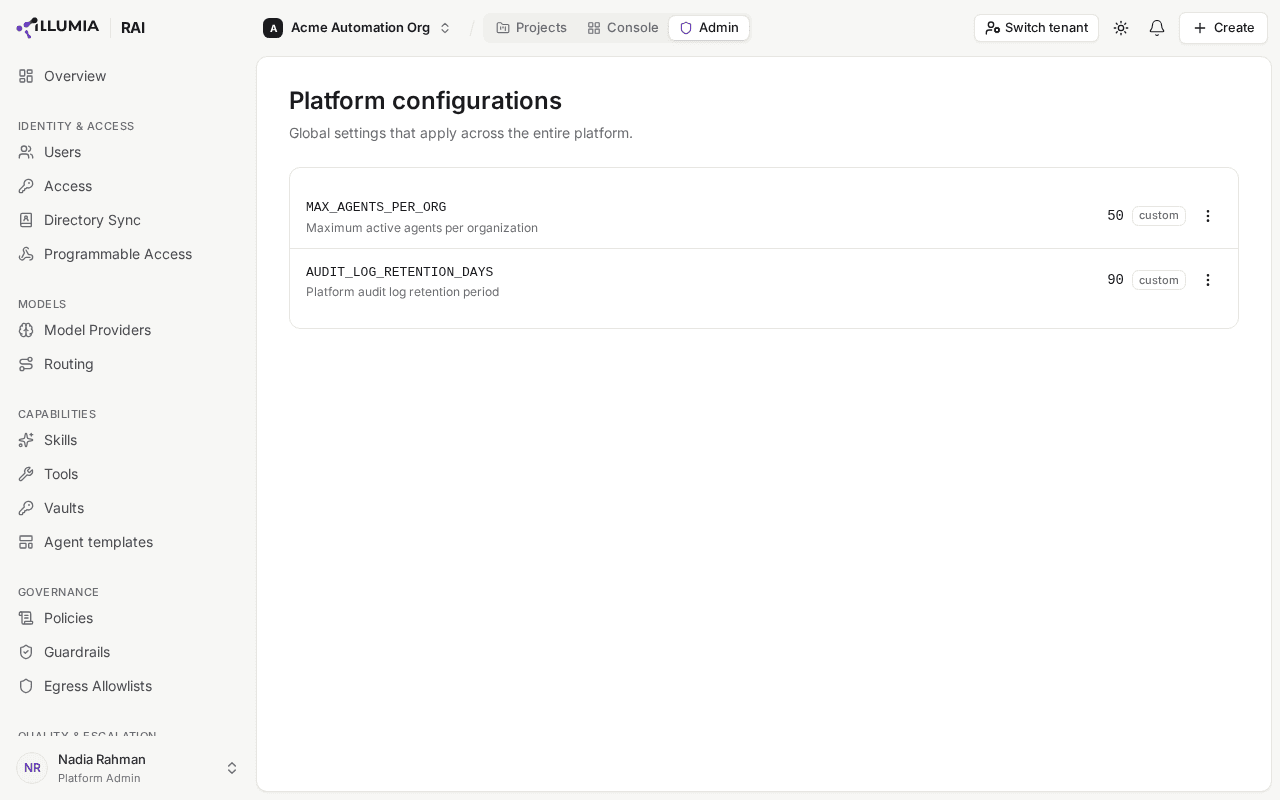
Each row shows its key and description, its value, and whether that value is the default or set for your tenant.
How a platform configuration works
- AskRAI enforces it. Each key is checked by the platform wherever it applies, and is never handed to an agent as an instruction, so it holds whatever an agent is told or decides.
- It is your tenant's alone. "Platform" here means your tenant: a value set here holds in every organization of your tenant, and reaches no other tenant.
- The keys are fixed. AskRAI decides which keys exist, and you choose their values. Each key has a range, and a value outside it is refused.
- Unset is the default. A key nobody has set changes nothing, and Reset returns a key to that state.
The list
Each row shows a key, with its description under it, then its value and a badge:
- default: the key is unset, so AskRAI behaves as it does without it.
- custom: an admin has set it, and AskRAI enforces the value shown.
| Key | Description | Range | When unset |
|---|---|---|---|
MAX_AGENTS_PER_ORG | Maximum active agents per organization. See below | 1 to 10,000 | No cap |
AUDIT_LOG_RETENTION_DAYS | Platform audit log retention period, in days. See below | 30 to 3,650 | Kept with no expiry |
Setting and resetting a key
Setting and resetting a key need Manage platform configurations. A holder of View platform configurations alone reads every row and changes nothing.
- Edit on a key's row sets its value. Once it is saved, the row's badge reads custom, and AskRAI enforces the new value from then on.
- Reset on a key's row returns the key to its default. The badge reads default again, and AskRAI behaves as it does with the key unset.
With Manage platform configurations, you can also choose Create → Platform configuration at the right of the top header, from anywhere on the Admin plane. It sits under Platform, and opens this page.
Each set and each reset is recorded in the Change Log under Platform configurations, with the key's value before and after.
Maximum active agents per organization
MAX_AGENTS_PER_ORG caps how many agents each organization in your tenant may have active at once. An organization's active agents are the agents of all its projects whose Status is Active. An agent On hold or Archived does not count. An agent's run state does not matter: an Active agent counts whether it is running, paused or stopped.
Every way of making an agent active counts the organization's active agents first, and is refused at the cap:
- Add agent on a project's Team tab, or Create → AI Agent, whether from scratch or from a template.
- Add to team on a Team Builder proposal: the proposed agent is not added.
- Changing an agent's Status to Active on its Overview tab.
The refusal names the cap and its key, and says how to make room: put one of the organization's agents On hold, archive or delete one, or ask a Platform Admin to raise the cap.
Lowering the cap stops no agent. An organization already over a lowered cap keeps every agent it has active. It adds or activates no other until it has fewer active agents than the cap.
Agents activated in the same instant can pass the cap. The count is taken as each agent is added or set Active, not reserved ahead of it, so two added or activated at the same moment can each find the one place left. The organization is then over its cap, and adds no more until it is back under.
Audit log retention
AUDIT_LOG_RETENTION_DAYS sets how many days your tenant's audit records are kept. Once a day, AskRAI deletes every audit record older than that many days:
- Query records: each question asked and its answer, with its governance details, as the Log shows them.
- Tool call records: each call to a tool, as a server's Calls tab on Tools lists them.
Nothing else is deleted. The Change Log, tickets, which keep their own question and answer, notifications and each project's Activity tab keep their own rules. An Activity entry for a tool call stays, but once its call's record is deleted it shows its line alone and no longer opens on the tool, its input and its result. While the key is unset, audit records are kept with no expiry.
What reads audit records then covers only the days kept. The Dashboard, and the statistics on Guardrails and Confidence thresholds, count only the records still kept, whatever period you choose. So do the public API's conversation history and a message's audit record, and the CLI and MCP tools built on them: a message whose record was deleted has none. Escalation rules judge each answer as it arrives, so retention changes nothing about which answers open a ticket.
Deleted records do not come back. Raising the value or resetting the key keeps records from then on, and restores none already deleted. The first deletion runs with the next daily run, at most about a day after the value is set.
Troubleshooting
| Symptom | Likely cause | Resolution |
|---|---|---|
Adding an agent, or setting one Active, is refused with a message naming MAX_AGENTS_PER_ORG | The organization already has as many active agents as the cap allows | Put another of its agents On hold, archive or delete one, or ask a Platform Admin to raise the cap |
An organization has more active agents than MAX_AGENTS_PER_ORG | The cap was lowered after they were active, or agents were activated in the same instant | Nothing is stopped. The organization adds and activates no agent until it has fewer active agents than the cap |
| Platform configurations is missing from the Admin sidebar | You hold neither View platform configurations nor Manage platform configurations | Ask for a role holding one of them on Admin → Access |
| Edit and Reset aren't available | You hold View platform configurations alone | Ask for a role holding Manage platform configurations |
| A value is refused | It is outside the key's range: MAX_AGENTS_PER_ORG takes 1 to 10,000, AUDIT_LOG_RETENTION_DAYS 30 to 3,650 | Enter a value in range, or Reset the key to its default |
| Older conversations are missing from the Log, or the Dashboard counts fewer queries for a past period | AUDIT_LOG_RETENTION_DAYS is set, and records older than it were deleted | Raise the value or Reset the key to keep records from now on. Deleted records cannot be restored |
Related pages
- Organizations — the organizations the agent cap counts within
- Team — add agents to a project and set their status
- Access — the roles that view or manage platform configurations
- Change Log — every set and reset, with the value before and after
- Conversation Logs — the query records audit retention deletes
Organizations
Group your projects under tenant-scoped organizations, switch the active organization to scope the Projects workspace, share an organization at Read, Write or Admin, and manage each organization's name and slug
Sandbox
Test AI responses with configurable guardrails and credentials, and inspect search, audit, identity, and guardrail results