Confidence Thresholds
Configure the score boundaries that classify AI responses into high, medium, and low confidence bands
Confidence thresholds determine how the platform categorizes each AI response into high, medium, or low confidence bands. These bands drive escalation rules, dashboard metrics, and the confidence labels shown in conversation logs — tuning them is one of the fastest ways to change how the AI assistant behaves without touching any content. The page also shows a Minimum Relevance Threshold slider, which decides how close a knowledge base match must be before the assistant will answer from it at all — see Minimum Relevance Threshold below.
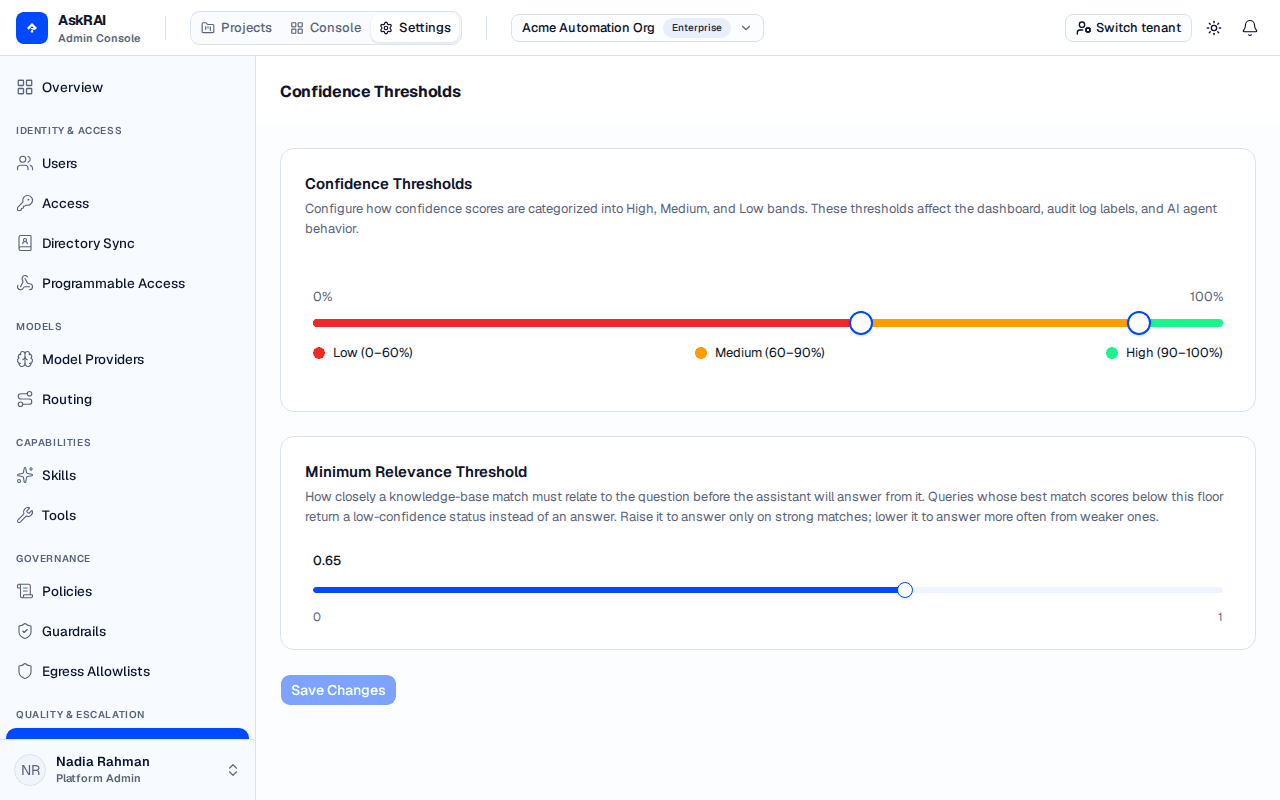
The two controls act at different moments: the relevance threshold decides whether an answer is generated at all, and the bands classify an answer that already exists.
Viewing and saving confidence thresholds is reserved for the Platform Admin role, assigned to users or groups under Settings → Access. Members do not see the Confidence Thresholds item in the Settings navigation and cannot open the page.
Confidence bands
The upper panel displays a dual-handle slider. Its rail is labelled 0% and 100%, but the two handles travel only between 1% and 99%, and they can never meet: the API rejects 0 and 1 as threshold values and additionally requires Medium to stay strictly below High, so the slider clamps to the reachable window (step 1%, minimum one step between the handles) rather than producing a pair the save would reject.
Drag the handles to set two boundaries that split every scored response into three bands:
- High confidence — responses scoring at or above the upper threshold (default: 90% and up)
- Medium confidence — responses scoring at or above the lower threshold but below the upper one (default: 60% up to, but not including, 90%)
- Low confidence — responses scoring below the lower threshold (default: below 60%)
A score that lands exactly on a boundary is classified into the higher band.
The slider uses a color gradient — green for high, yellow for medium, and red for low — so you can see the relative size of each band at a glance.
Previewing the impact
When you adjust either threshold, a reclassification preview appears below the slider. The preview analyzes the last 30 days of conversation data and shows:
- Current vs. proposed counts — how many conversations fall into each band under the current and proposed thresholds
- Reclassification impact — conversations that would move to or from the Medium band (High → Medium, Medium → Low, Low → Medium, Medium → High)
This helps you understand the effect of a change before you save it.
The reclassification list is not a complete account of the change. It only reports moves that touch the Medium band — a conversation that jumps straight from High to Low (or Low to High) is discarded before it reaches the preview. If your proposed bands cause only such jumps, the reclassification section does not render at all, even though the Current vs. Proposed band counts visibly shift. Trust the Current vs. Proposed counts, not the reclassification total, as the measure of how much a change moves.
The preview uses 30 days of historical data. If your tenant is new or has low conversation volume, the preview may show limited results — make small threshold changes and watch the dashboard for a day or two before tightening them further.
Minimum relevance threshold
The second panel on the page holds a single slider labelled Minimum Relevance Threshold, which defaults to 0.65. It is a floor on retrieval: when the best knowledge base match for a question does not reach it, the assistant declines to answer rather than answering from weak material. Your tenant's saved value is what the assistant applies.
The number is a similarity score in the range 0–1, not a percentage of correctness. Text with nothing to do with the question still scores around 0.5 on that scale, which is why the default sits above it — a threshold at or below roughly 0.5 admits everything and switches the gate off. Raise it to answer only on strong matches; lower it to answer more often from weaker ones.
Both directions have a cost, and neither reports an error. Set it too high and answerable questions turn into the canned low-confidence reply for every user. Set it near or below 0.5 and the assistant will summarise whatever came back nearest, however unrelated. Do not expect that to quieten your escalation queue: Escalation Rules are keyed on the confidence band of the answer that was generated, never on this floor. An answer synthesised from weak material still bands Low when it scores below your Medium threshold, and still fires the same rule — except the ticket now cites a wrong answer that reached a user instead of a clean decline. If instead the assessment rates a fluent but unfounded answer Medium or High, the rule stops firing and you lose the signal entirely. This slider is a lever on answer quality, not on escalation volume. Move it a step at a time and watch the dashboard.
0.65 is a deliberately permissive starting point rather than a tuned value. Tune it from your own traffic, and note that a value saved before the slider was recalibrated was not carried forward — every tenant starts from the default until it is set again.
The gate itself runs after knowledge base retrieval and before answer generation — earlier in the pipeline than the confidence bands, which classify answers that have already been generated. AskRAI compares the highest relevance score from the retrieval step against your saved threshold:
- If the best match reaches the threshold — an answer is generated and scored for confidence as usual
- If every result scores below it — generation is skipped entirely and a fixed low-confidence reply is returned ("I couldn't find sufficient information to answer your question…") instead of a generated answer
The same floor is applied on the streaming and non-streaming paths — on the streaming path it is evaluated before the first token is sent, so a declined answer never starts rendering. A curated Q&A answer returned verbatim from the knowledge base is held to a stricter bar instead: a fixed 0.85, or your threshold if you have raised it above that. Anywhere at or below 0.85 — the default 0.65 included — this slider therefore changes nothing about which questions get a verbatim curated answer. A saved change applies to new queries as soon as the assistant picks the settings up, which is within five minutes at the outside.
Saving threshold changes
Adjust the Thresholds
Drag the band slider to change the High and Medium boundaries, and the Minimum Relevance Threshold slider to change the retrieval floor. Both are applied once saved.
Review the Preview
Check the impact preview under the sliders to confirm the effect of your proposed bands. Read the Current vs. Proposed band counts — the reclassification list below them omits any conversation that moves directly between High and Low.
Save Changes
Click Save Changes at the bottom of the page. The button is disabled until you make a change. To undo your edits without saving, click Discard.
A confidence band is not stored on a conversation — it is derived from the stored score against the current thresholds every time it is read. Saving new thresholds therefore re-bands your history immediately: dashboard band counts and success rate for periods that have already elapsed will shift, which is exactly what the impact preview is showing you. The stored confidence scores themselves are never rewritten, and escalation rules that already ran against past conversations are not re-evaluated.
Field reference
| Field | Description | Range | Default |
|---|---|---|---|
| High Threshold | Minimum score for the High confidence band | 2–99% — 0% and 100% are unreachable, and the High handle cannot sit on or below the Medium handle | 90% |
| Medium Threshold | Minimum score for the Medium confidence band | 1–98% — always at least one percentage point below High | 60% |
| Minimum Relevance Threshold | Similarity the best knowledge base match must reach before an answer is generated | 0.00–1.00 in steps of 0.05. Unrelated text scores around 0.5, so anything at or below that effectively disables the gate | 0.65 |
Related pages
- Escalation Rules — define automated actions based on confidence bands
- Model Routing — configure the confidence assessment model used to score responses
- Dashboard — monitor confidence distributions and success rate trends
- Conversation Logs — review audit records with confidence scores