Access
Grant the Platform Admin and Member tenant roles to directory users or groups, and control who can reach Settings
Access is where you decide who administers your tenant. Everyone who signs in is a Member by default and can use the console and their projects; only a Platform Admin can open Settings and change how the tenant is configured. Manage those grants under Settings → Access.
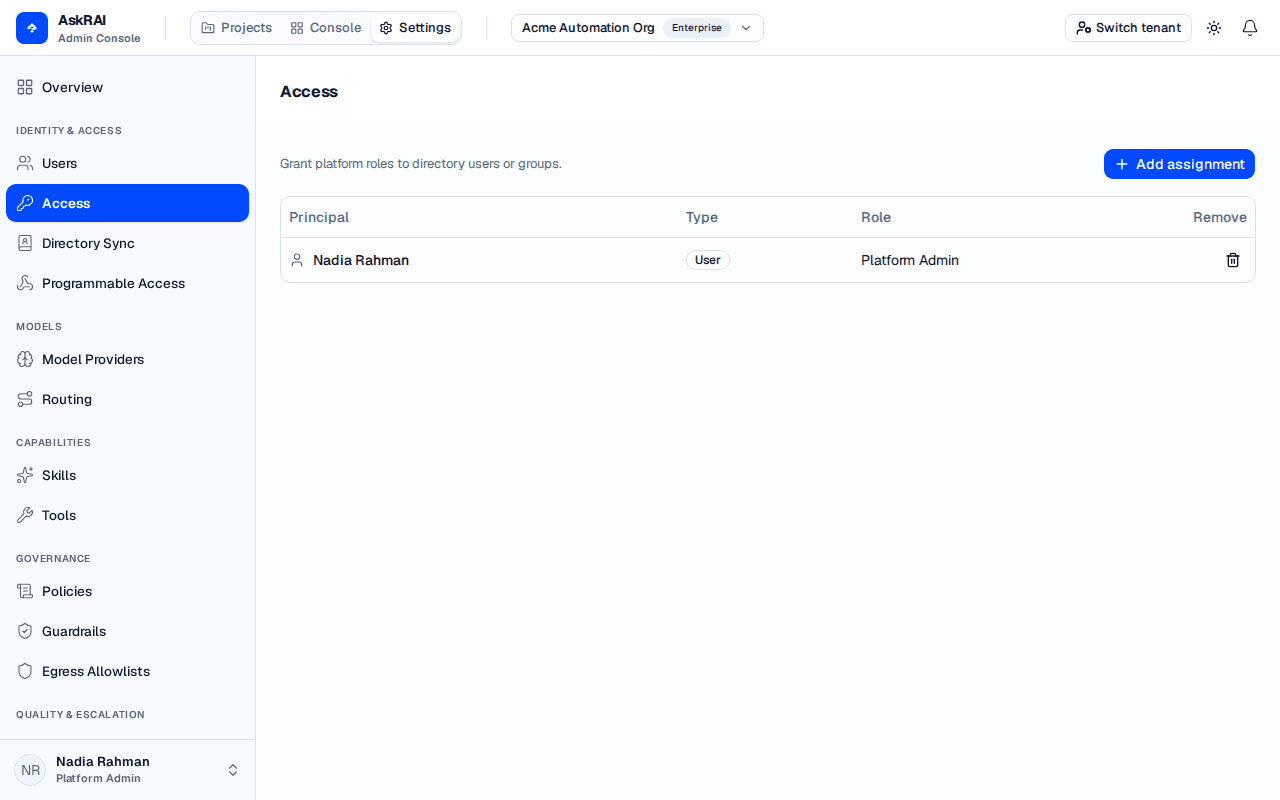
Each row is one role assignment: who it applies to, whether that principal is a user or a group, and which role they hold.
How tenant roles work
A tenant role is a bundle of permissions, and each permission unlocks one area of Settings. AskRAI ships with two roles:
| Role | What it grants | Who should hold it |
|---|---|---|
| Platform Admin | Every permission — the full Settings surface, including this Access page | The small group who configure the tenant |
| Member | No Settings permissions | Everyone else — the default for any signed-in user |
Members are not locked out of the product. A Member keeps full use of the console (Dashboard, Log, Tickets, Guardrails, Knowledge Packs, Knowledge Base, Sandbox) and of the Projects workspace. What a Member cannot do is reach Settings — the Settings control never appears in their top navigation, and a Settings URL they open directly returns them to Projects.
You never have to assign the Member role. A user with no assignment at all is already a Member. Assigning Member explicitly is only useful as documentation — a visible record that you considered this person and deliberately left them without administrative access.
What a Platform Admin unlocks
Every Settings area is reserved for Platform Admin. The sidebar groups them into six sections:
| Section | Settings area | What it controls |
|---|---|---|
| Identity & Access | Users | User accounts, native groups, roles, and the synced directory |
| Access | Role assignments — this page | |
| Directory Sync | SCIM 2.0 and Google Workspace provisioning | |
| Programmable Access | API, CLI, and MCP credentials | |
| Models | Model Providers | Bring-your-own-model provider connections |
| Routing | Which model answers which query | |
| Capabilities | Skills | Versioned capability packs your agents can be given |
| Tools | The MCP servers and builtins your agents can call | |
| Governance | Policies | Bundles of controls, and the ceilings they place on an agent |
| Guardrails | The checks themselves — what each one reads, and what it does about it | |
| Egress Allowlists | The hosts an agent's tools are allowed to reach | |
| Quality & Escalation | Confidence Thresholds | The score bands that classify AI responses |
| Escalation Rules | Automated actions triggered by confidence | |
| Alerts | Notification channels — marked Coming soon | |
| Platform | Organizations | The organizations that group your projects |
Each area is protected separately behind the scenes, so the model extends without redesign: a future role that grants only some of these areas is a configuration change, not a rebuild.
The first Platform Admin
You do not have to bootstrap access by hand. The first genuine user to sign in to a tenant is promoted to Platform Admin automatically, so the tenant is never left with nobody who can administer it. Every user who signs in after that is a Member until an admin says otherwise.
Assigning a role
Open the dialog. On Settings → Access, click Add assignment.
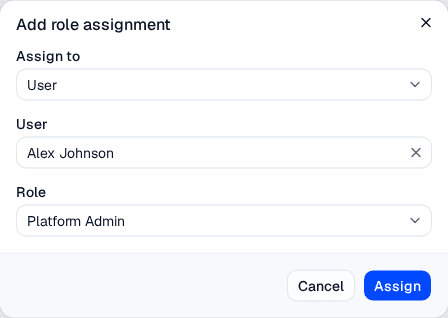
Choose whether you are granting the role to a user or a group, pick the principal, and choose the role.
Choose what you are assigning to. Set Assign to to User or Group. Switching between them clears the picker, so you cannot accidentally submit a user you selected as a group.
Pick the principal. Type in the picker to search your directory. The list searches the server as you type, so you are never limited to a first page of results — anyone in the directory can be found by name or email.
Choose the role. Select Platform Admin or Member, then click Assign. The new assignment appears immediately in the table.
Assigning is idempotent: granting a role a principal already holds changes nothing and reports no error, so it is safe to re-run.
Assigning to a group
Granting a role to a group is the better choice for anything but a one-off. Everyone in the group inherits the role, and membership is managed where it belongs — in your identity provider, through Directory Sync — rather than in a list you have to remember to update when someone joins or leaves.
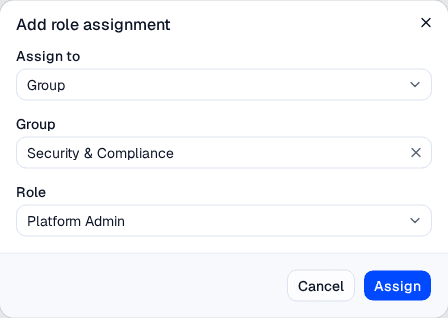
Grant Platform Admin to a group and every member of that group becomes an admin, with membership managed in your identity provider.
A user's effective role is the union of their own assignment and the assignments of every group they belong to. Holding Platform Admin from any one of them makes them a Platform Admin.
You can only assign a role to a user or group that exists in your directory. If someone is missing from the picker, provision them through Directory Sync first — AskRAI will not grant a role to an identity it does not know.
Removing an assignment
Click the trash icon on any row to revoke that grant. The user (or every member of that group) drops back to whatever their remaining assignments give them — usually Member.
The tenant always keeps at least one admin. Removing the last Platform Admin that is assigned directly to a user is refused, so a tenant can never lock itself out. Note that a group assignment does not satisfy this — a group can be emptied in your identity provider, which would strip the tenant's last admin. Grant Platform Admin to at least one individual user, and assign the second admin before removing the first.
Role changes take effect within about 30 seconds, the lifetime of the permission cache. A user whose role you just changed may need to reload the console to see Settings appear or disappear.
Field reference
Assignment table
| Column | Description |
|---|---|
| Principal | The user or group holding the role, shown by display name |
| Type | user or group |
| Role | Platform Admin or Member |
| Remove | Revokes this assignment |
Add role assignment dialog
| Field | Description | Required |
|---|---|---|
| Assign to | Whether the role goes to a User or a Group | Yes |
| User / Group | The directory principal, found by typing to search | Yes |
| Role | Platform Admin or Member | Yes |
Troubleshooting
| Symptom | Cause | Fix |
|---|---|---|
| A user cannot see the Settings control | They hold no Settings permission — they are a Member | Assign them Platform Admin, directly or through a group |
| A user opens a Settings link and lands on Projects | Same cause — the route guard redirects a Member away | As above |
| A role change has not taken effect | The permission cache has not expired yet | Wait ~30 seconds and reload the console |
| The person you want is missing from the picker | They are not in the synced directory | Provision them through Directory Sync |
| Removing an admin is refused | They are the tenant's last user-assigned Platform Admin | Assign Platform Admin to another user first, then remove |
Related pages
- Users, Roles & Groups — the directory users and native groups you assign roles to here
- Directory Sync — provision the users and groups that appear in the picker
- Access Control — how tenant roles differ from the resource-access roles that govern knowledge and guardrails
- Programmable Access — authenticate machines and agents, which are governed separately from the people on this page
- Settings — every area a Platform Admin unlocks